วิธีปิดระบบป้องกันของ Microsoft Edge เพื่อ download ไฟล์

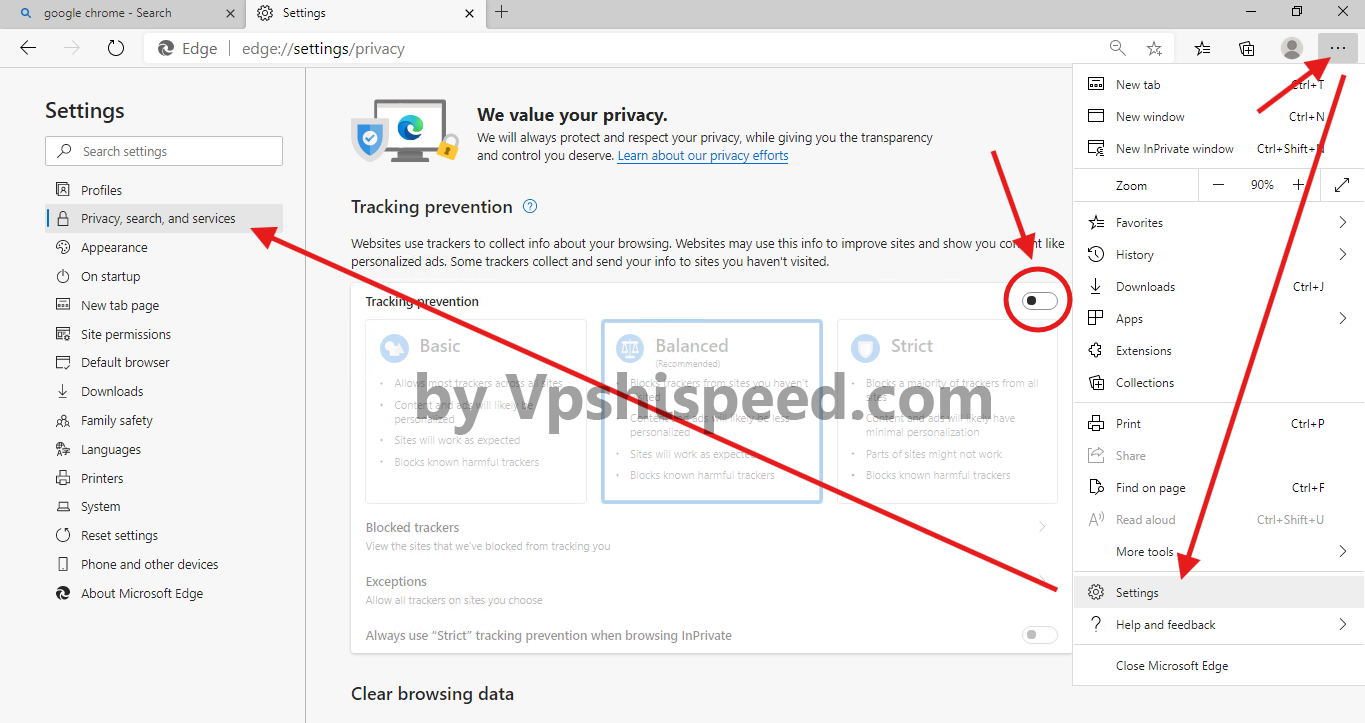
  1. เปิด Microsoft Edge แล้วคลิกที่เครื่องหมาย ... มุมขวาบนตามภาพแล้วเลือก Settings
  2. คลิกที่เมนู Privacy, search, and services ด้านซ้ายตามภาพ
  3. ไปที่หัวข้อ Tracking prevention จากนั้นคลิกให้จุดสีดำไปทางซ้ายเพื่อปิดตามภาพด้านล่าง *จากนั้นสามารถเว็บไปเพื่อ download ไฟล์ที่ต้องการได้เลย
  • 0 Users Found This Useful
Was this answer helpful?

Related Articles

การเปลี่ยนรหัสผ่านบน Windows Server

ให้เราเข้าไปใน VPS และในหน้า Desktop ให้กดปุ่ม Ctrl+Alt+End บนคีย์บอร์ดให้กดตรง Change...

การติดตั้ง ftp ใน windows server2008

หลังจากที่เราได้ทำการเปิด remote desktop แล้ว [คลิกเพื่อดู] ต่อไปเป็นขั้นตอนการติดตั้ง ftp...

How to access Remote Desktop [VPS Windows]

1.Press "start+r" on the keyboard and type "mstsc" as shown in the picture and press the "OK"...

เปลี่ยนรหัสผ่าน VPS Windows Server2008

เปลี่ยนรหัสผ่าน remote ของ VPS Windows Server ง่ายๆแบบนี้ครับกดปุ่ม Ctrl+alt+Endคลิก Change a...

How to renew the Windows License for Windows server

Step 1.Enter the Remote desktop and connect. Click the Start button and right-click on  Command...